Autonomous Harness: Taming Wild AI Agents with Test-Driven Development
Table of Contents
- The Problem: AI Agents Are Like Caffeinated Interns
- The Solution: Test-Driven Development as a Hard Constraint
- Architecture Overview: The Six Phases of TDD Enlightenment
- Phase 0: Initialize—The Grand Design
- Phase 1: Architect—Opus Writes the Tests
- Phase 2: Red Check—The Moment of Truth
- Phase 3: Implement—Sonnet Does the Heavy Lifting
- Phase 4: Green Check—Retry Until You Succeed
- Phase 5: Verify—Five Layers of Trust Issues
- Security: The Hooks That Keep Agents Honest
- State Management: Feature List as Source of Truth
- Tracing: Because “It Worked on My Machine” Isn’t Good Enough
- Daemon Mode: 24/7 Autonomous Operation
- The Web Dashboard: Real-Time Agent Monitoring
- The Muscle: Claude Agent SDK Deep Dive
- Plugin Architecture: Extensibility by Design
- LSP Integration: Code Intelligence for Agents
- Subagents: Specialized Workers in the Pipeline
- Lessons Learned: What the Harness Taught Me
- Future Work: Where Do We Go From Here
- References & Further Reading
The Problem: AI Agents Are Like Caffeinated Interns
Let me paint you a picture. It’s 2 AM. You’ve given an AI coding agent a simple task: “Build a REST API for user authentication.” You wake up to find 47 files modified, three new npm packages installed (one of which hasn’t been updated since 2019), and a utils.js file that somehow contains a cryptocurrency miner. The tests? What tests?
This is the fundamental problem with autonomous AI coding agents. They’re incredibly capable—like hiring a senior engineer who can type at 10,000 WPM—but they have the attention span of a golden retriever at a squirrel convention. Without guardrails, they’ll write code that looks correct, passes a quick glance, and then explodes in production at 3 AM on a Friday.
I’ve spent months watching AI agents:
- Write tests that test nothing (the classic “assert true equals true”)
- Modify files outside their assigned scope
- “Fix” bugs by deleting the code that contained them
- Install dependencies that have more CVEs than features
- Generate code that works for the happy path and nothing else
The problem isn’t intelligence. Claude Opus 4.5 is genuinely brilliant. The problem is discipline. AI agents don’t naturally follow software engineering best practices because they’re optimizing for “task completion,” not “maintainable, tested, production-ready code.”
So I asked myself: What if we could enforce discipline? What if we could make TDD not optional, but mandatory? What if we built a system that would literally refuse to let an agent write implementation code until it had proven that its tests actually fail?
Thus was born the Autonomous Harness.
The Solution: Test-Driven Development as a Hard Constraint
The Autonomous Harness is a production-grade orchestration system that implements strict TDD enforcement for AI coding agents. It’s not a suggestion. It’s not a prompt that says “please write tests first.” It’s a hard invariant enforced by the orchestrator itself.
Here’s the core philosophy:
Tests MUST fail before implementation is allowed.
Tests MUST pass after implementation.
No exceptions. No workarounds. No "I'll add tests later."
The harness achieves this through a multi-phase pipeline:
ARCHITECT (Opus) → RED CHECK (Harness) → IMPLEMENT (Sonnet) → GREEN CHECK (Harness) → VERIFY (Multi)
| Phase | Agent | What Happens |
|---|---|---|
| ARCHITECT | Opus | Tests created |
| RED CHECK | Harness | Tests must FAIL |
| IMPLEMENT | Sonnet | Code written |
| GREEN CHECK | Harness | Tests must PASS |
| VERIFY | Multi-layer | 5 verification layers |
The magic happens in those “RED CHECK” and “GREEN CHECK” phases. The harness literally runs the tests and verifies:
- RED CHECK: Tests must return a non-zero exit code (failure)
- GREEN CHECK: Tests must return zero exit code (success)
If tests pass during RED CHECK—meaning they didn’t actually test anything that doesn’t exist yet—the harness marks the feature as FAILED with reason “TDD Violation.” No negotiation.
Architecture Overview: The Six Phases of TDD Enlightenment
Let me walk you through the complete architecture. This isn’t a simple wrapper script—it’s a full orchestration system with state management, security enforcement, and multi-layer verification.
Layer 1: CLI Entry Points
| Component | File | Purpose |
|---|---|---|
| Main CLI | tdd_harness.py |
Entry point, argument parsing |
| Daemon Mode | autonomous_loop.py |
Continuous execution |
| Arguments | --project-dir, --task, --prompt, --daemon |
Configuration |
Layer 2: TDD Orchestrator
harness/tdd/orchestrator.py - The brain of the operation:
- Phase coordination
- Agent invocation
- State transitions
- Error handling & retry logic
Layer 3: Phase Runners
| Phase | Model | Location |
|---|---|---|
| ARCHITECT | Opus | phases/architect.py |
| RED_CHECK | Harness | phases/red_check.py |
| IMPLEMENT | Sonnet | phases/implement.py |
| GREEN_CHECK | Harness | phases/green_check.py |
| VERIFY | Multi | phases/verify.py |
Layer 4: Support Systems
| System | Purpose | Key Files |
|---|---|---|
| State Manager | Feature tracking, state machine | feature_list.json |
| Security Hooks | Bash whitelist, scope enforcement, test protection | hooks/security.py |
| Tracing | Event log, artifacts, progress | events.jsonl |
| Git Ops | Commits, rollback, diff check | git/operations.py |
Let’s dive deep into each phase.
Phase 0: Initialize—The Grand Design
Before any TDD can happen, we need a plan. The Initialize phase is where the magic begins—where a simple task description transforms into a structured, executable feature list.
Input: A markdown file describing what you want to build, or a direct prompt.
Agent: Claude Opus 4.5
Output: A feature_list.json containing 30-50+ atomic features with dependencies.
Here’s what happens:
async def run_initialize_phase(task: str, project_dir: Path) -> FeatureList:
    """
    Opus analyzes the task and creates a complete feature breakdown.
    """

    # Create fresh context (no pollution from previous tasks)
    client = ClaudeAgentOptions(
        model="claude-opus-4-5-20251101"
    )

    prompt = f"""
    Analyze this task and create a comprehensive feature breakdown:

    {task}

    Requirements:
    1. Break into 30-50+ atomic features
    2. Each feature must be independently testable
    3. Define dependencies between features
    4. Assign priority levels
    5. Specify allowed_files patterns for each feature
    6. Include test_command for each feature
    """

    # Opus does the heavy lifting
    result = await client.run(prompt)

    # Parse and validate the feature list
    feature_list = parse_feature_list(result.output)

    # Create project scaffold
    await create_init_sh(project_dir)
    await create_progress_file(project_dir)
    await initialize_git_repo(project_dir)

    return feature_list
The resulting feature_list.json looks like this:
{
  "features": [
    {
      "id": "feat-001",
      "name": "Database Connection Pool",
      "description": "Implement connection pooling with configurable size and timeout",
      "test_command": "pytest tests/test_db_pool.py -v",
      "allowed_files": ["src/db/**/*", "tests/test_db_pool.py"],
      "dependencies": [],
      "priority": 1,
      "complexity": "medium",
      "status": "PENDING",
      "retry_count": 0
    },
    {
      "id": "feat-002",
      "name": "User Model",
      "description": "SQLAlchemy model for users with validation",
      "test_command": "pytest tests/test_user_model.py -v",
      "allowed_files": ["src/models/user.py", "tests/test_user_model.py"],
      "dependencies": ["feat-001"],
      "priority": 2,
      "complexity": "low",
      "status": "PENDING",
      "retry_count": 0
    }
    // ... 48 more features
  ]
}
The key insight here is atomic features. Each feature should be:
- Small enough to implement in one session
- Independently testable
- Clearly scoped with specific file patterns
- Dependent on previously verified features
This decomposition is crucial. A feature like “implement user authentication” is too big. Break it down into:
- feat-001: Password hashing utility
- feat-002: User model with validation
- feat-003: JWT token generation
- feat-004: JWT token verification
- feat-005: Login endpoint
- feat-006: Logout endpoint
- feat-007: Refresh token endpoint
- feat-008: Auth middleware
- feat-009: Protected route decorator
Each of these can be TDD’d independently, verified, and committed before moving to the next.
Phase 1: Architect—Opus Writes the Tests
This is where TDD begins. The Architect phase creates the tests that will drive the implementation.
Agent: Claude Opus 4.5 (fresh context—no pollution)
Allowed Files: Test patterns only (tests/**/*, *.test.*, *.spec.*)
Key Constraint: Tests must target functionality that doesn’t exist yet.
async def run_architect_phase(feature: Feature) -> PhaseResult:
    """
    Opus creates comprehensive tests for the feature.
    These tests MUST fail because the implementation doesn't exist.
    """

    # Fresh context for each feature
    client = ClaudeAgentOptions(
        model="claude-opus-4-5-20251101",
        allowed_files=["tests/**/*", "*.test.*", "*.spec.*"]
    )

    prompt = f"""
    Create comprehensive tests for: {feature.name}

    Description: {feature.description}

    Requirements:
    1. Write REAL executable tests, not descriptions
    2. Tests must import from non-existent modules
    3. Tests must call functions that don't exist yet
    4. Cover edge cases, error handling, and happy paths
    5. Use proper assertions with meaningful messages

    The implementation does NOT exist. Your tests should fail with
    "ModuleNotFoundError" or "AttributeError" when run.
    """

    result = await client.run(prompt)

    # Commit the tests
    await git_commit(
        feature.project_dir,
        f"test({feature.id}): create TDD tests for {feature.name}"
    )

    # Update state
    await state_manager.update_status(feature.id, "TEST_CREATED")

    return PhaseResult(status="success", artifacts=result.files_created)
Here’s an example of what Opus might generate for a “User Authentication” feature:
# tests/test_auth.py
import pytest
from src.auth.service import AuthService
from src.auth.exceptions import InvalidCredentials, TokenExpired
from src.models.user import User

class TestAuthService:
    """Test suite for authentication service."""

    @pytest.fixture
    def auth_service(self):
        return AuthService(secret_key="test-secret", token_expiry=3600)

    @pytest.fixture
    def test_user(self):
        return User(
            email="test@example.com",
            password_hash="$2b$12$...",  # bcrypt hash
            is_active=True
        )

    def test_login_with_valid_credentials(self, auth_service, test_user):
        """Should return JWT token for valid credentials."""
        token = auth_service.login(
            email="test@example.com",
            password="correct_password"
        )

        assert token is not None
        assert isinstance(token, str)
        assert len(token) > 50  # JWT tokens are long

    def test_login_with_invalid_password(self, auth_service, test_user):
        """Should raise InvalidCredentials for wrong password."""
        with pytest.raises(InvalidCredentials) as exc_info:
            auth_service.login(
                email="test@example.com",
                password="wrong_password"
            )

        assert "Invalid credentials" in str(exc_info.value)

    def test_login_with_nonexistent_user(self, auth_service):
        """Should raise InvalidCredentials for unknown email."""
        with pytest.raises(InvalidCredentials):
            auth_service.login(
                email="nobody@example.com",
                password="any_password"
            )

    def test_verify_valid_token(self, auth_service, test_user):
        """Should return user data for valid token."""
        token = auth_service.login("test@example.com", "correct_password")
        payload = auth_service.verify_token(token)

        assert payload["email"] == "test@example.com"
        assert "exp" in payload
        assert "iat" in payload

    def test_verify_expired_token(self, auth_service):
        """Should raise TokenExpired for expired JWT."""
        expired_token = "eyJ..."  # Manually crafted expired token

        with pytest.raises(TokenExpired):
            auth_service.verify_token(expired_token)

    def test_verify_tampered_token(self, auth_service):
        """Should raise InvalidToken for tampered JWT."""
        tampered_token = "eyJ...tampered..."

        with pytest.raises(auth_service.InvalidToken):
            auth_service.verify_token(tampered_token)
Notice how these tests import from modules that don’t exist (src.auth.service, src.auth.exceptions). Running these tests will fail with ModuleNotFoundError—exactly what we want.
Phase 2: Red Check—The Moment of Truth
This is where the harness earns its keep. The Red Check phase runs the tests and verifies they fail.
async def run_red_check_phase(feature: Feature) -> PhaseResult:
    """
    Run tests and verify they FAIL.
    If tests pass, this is a TDD violation—tests don't test anything real.
    """

    # Run the test command
    result = subprocess.run(
        feature.test_command,
        shell=True,
        capture_output=True,
        timeout=feature.test_timeout or 300
    )

    if result.returncode == 0:
        # TDD VIOLATION: Tests passed when they shouldn't
        await state_manager.update_status(
            feature.id,
            "FAILED",
            reason="TDD Violation: Tests passed before implementation exists"
        )

        return PhaseResult(
            status="failed",
            reason="TDD Violation",
            details="Tests must fail before implementation. Your tests passed, "
                    "which means they don't actually test the feature."
        )

    # Tests failed as expected—TDD is working
    await events.emit("TDD_RED_VERIFIED", feature_id=feature.id)

    return PhaseResult(status="success", message="Tests fail as expected (RED)")
This is the hard invariant I mentioned earlier. If tests pass during Red Check:
- The feature is marked as FAILED
- The reason is logged as “TDD Violation”
- The agent cannot proceed to implementation
- A human must intervene or the feature gets retried with different tests
Why is this so important? Because without this check, agents will write tests like:
def test_user_exists():
    assert True  # USELESS
Or they’ll write tests that accidentally test existing functionality rather than the new feature. The Red Check ensures that tests are actually testing something that doesn’t exist yet.
Phase 3: Implement—Sonnet Does the Heavy Lifting
Now we get to write code! The Implement phase uses Claude Sonnet (faster, cheaper) to write the minimum code needed to pass the tests.
Agent: Claude Sonnet (fresh context)
Allowed Files: Source patterns only (src/**/*)
Read-Only Files: Test patterns (can read but not modify)
async def run_implement_phase(feature: Feature) -> PhaseResult:
    """
    Sonnet implements the feature based on the tests.
    Tests are read-only—no cheating by changing them.
    """

    # Fresh context with strict file permissions
    client = ClaudeAgentOptions(
        model="claude-sonnet-4-20250514",
        allowed_files=feature.allowed_files,  # src patterns only
        read_only_files=["tests/**/*", "*.test.*", "*.spec.*"]
    )

    # Read the test file for context
    test_content = await read_file(feature.test_file)

    prompt = f"""
    Implement the code to pass these tests:

    ```
    {test_content}
    ```

    Requirements:
    1. Write MINIMAL code to pass the tests
    2. Do NOT over-engineer or add extra features
    3. Focus on making tests pass, not on "nice to have"
    4. You can READ test files but NOT modify them
    """

    result = await client.run(prompt)

    # Commit the implementation
    await git_commit(
        feature.project_dir,
        f"impl({feature.id}): implement {feature.name}"
    )

    return PhaseResult(status="success", artifacts=result.files_created)
The key constraint here is test immutability. During implementation, tests are read-only. This prevents the classic anti-pattern where an agent “fixes” failing tests by changing the tests instead of writing correct implementation code.
The Sonnet prompt emphasizes minimal implementation. We’re not looking for beautiful, over-engineered code. We want the simplest thing that makes tests pass. Refactoring comes later (or in a separate feature).
Phase 4: Green Check—Retry Until You Succeed
After implementation, we verify that tests now pass. But here’s the twist: we don’t give up on the first failure.
async def run_green_check_phase(feature: Feature) -> PhaseResult:
    """
    Run tests and verify they PASS.
    Retry up to 3 times, sending error output to Sonnet for fixes.
    """

    MAX_RETRIES = 3

    for attempt in range(MAX_RETRIES):
        # Run tests
        result = subprocess.run(
            feature.test_command,
            shell=True,
            capture_output=True,
            timeout=feature.test_timeout or 300
        )

        if result.returncode == 0:
            # SUCCESS! Tests pass
            await events.emit("TDD_GREEN_VERIFIED", feature_id=feature.id)
            return PhaseResult(status="success", message="Tests pass (GREEN)")

        if attempt < MAX_RETRIES - 1:
            # Send error to Sonnet for fix
            error_output = result.stderr.decode() or result.stdout.decode()

            fix_result = await run_fix_attempt(
                feature,
                error_output,
                attempt + 1
            )

            # Commit the fix
            await git_commit(
                feature.project_dir,
                f"fix({feature.id}): fix attempt {attempt + 1}"
            )

    # All retries exhausted
    return PhaseResult(
        status="failed",
        reason=f"Tests still failing after {MAX_RETRIES} attempts",
        details=result.stderr.decode()
    )

async def run_fix_attempt(feature: Feature, error: str, attempt: int):
    """Send error to Sonnet and request a fix."""

    client = ClaudeAgentOptions(
        model="claude-sonnet-4-20250514",
        allowed_files=feature.allowed_files
    )

    prompt = f"""
    Tests are failing. Fix the implementation.

    Error output:
    ```
    {error}
    ```

    This is attempt {attempt} of 3. Focus on the specific error shown above.
    """

    return await client.run(prompt)
This retry mechanism is crucial. First attempts often fail due to:
- Missing imports
- Typos in function names
- Edge cases not handled
- Incorrect return types
Rather than immediately marking the feature as failed, we give Sonnet a chance to learn from the error and fix it. The error output provides valuable context that often leads to quick fixes.
The progression typically looks like:
Attempt 1: ImportError: No module named 'src.auth'
→ Sonnet adds __init__.py files

Attempt 2: AttributeError: 'User' object has no attribute 'password_hash'
→ Sonnet adds the missing attribute

Attempt 3: AssertionError: Expected 'Invalid credentials', got 'Error'
→ Sonnet fixes the error message

Tests pass! ✓
Phase 5: Verify—Five Layers of Trust Issues
Tests passing isn’t enough. The Verify phase runs five separate verification layers, all of which must pass.
async def run_verify_phase(feature: Feature) -> PhaseResult:
    """
    Multi-layer verification: unit tests, API, browser, scope, and Opus review.
    ALL layers must pass for VERIFIED status.
    """

    layers = [
        UnitTestLayer(),       # Run tests again (double-check)
        APIVerificationLayer(), # Test API endpoints if defined
        BrowserVerificationLayer(),  # Puppeteer UI tests if defined
        ScopeCheckLayer(),     # Verify git diff matches allowed_files
        OpusVerificationLayer()  # Code review with Opus
    ]

    for layer in layers:
        result = await layer.verify(feature)

        if not result.passed:
            return PhaseResult(
                status="failed",
                reason=f"Verification failed: {layer.name}",
                details=result.details
            )

    # All layers passed
    return PhaseResult(status="verified")
Let’s look at each layer:
Layer 1: Unit Tests (Again)
class UnitTestLayer:
    """Double-check that tests still pass."""

    async def verify(self, feature: Feature) -> LayerResult:
        result = subprocess.run(feature.test_command, ...)
        return LayerResult(passed=result.returncode == 0)
Why run tests twice? Because sometimes the implementation phase introduces side effects that aren’t caught immediately. This is a sanity check.
Layer 2: API Verification
class APIVerificationLayer:
    """Test API endpoints with real HTTP requests."""

    async def verify(self, feature: Feature) -> LayerResult:
        if not feature.api_steps:
            return LayerResult(passed=True, skipped=True)

        for step in feature.api_steps:
            response = await http_client.request(
                method=step.method,
                url=step.url,
                json=step.body
            )

            if response.status != step.expect.status:
                return LayerResult(
                    passed=False,
                    details=f"Expected {step.expect.status}, got {response.status}"
                )

        return LayerResult(passed=True)
API steps are defined in the feature spec:
{
  "api_steps": [
    {
      "method": "POST",
      "url": "http://localhost:8000/api/login",
      "body": {"email": "test@example.com", "password": "password123"},
      "expect": {"status": 200, "body_contains": "token"}
    },
    {
      "method": "GET",
      "url": "http://localhost:8000/api/me",
      "headers": {"Authorization": "Bearer "},
      "expect": {"status": 200, "body_contains": "email"}
    }
  ]
}
Layer 3: Browser Verification
class BrowserVerificationLayer:
    """Test UI with Puppeteer via MCP."""

    async def verify(self, feature: Feature) -> LayerResult:
        if not feature.browser_steps:
            return LayerResult(passed=True, skipped=True)

        # Use Puppeteer MCP server
        for step in feature.browser_steps:
            result = await puppeteer_mcp.execute(step)
            if not result.success:
                return LayerResult(passed=False, details=result.error)

        return LayerResult(passed=True)
Browser steps are human-readable instructions:
{
  "browser_steps": [
    "Navigate to http://localhost:3000/login",
    "Type 'test@example.com' into input[name='email']",
    "Type 'password123' into input[name='password']",
    "Click button[type='submit']",
    "Wait for navigation to /dashboard",
    "Verify text 'Welcome back' is visible"
  ]
}
Layer 4: Scope Check
class ScopeCheckLayer:
    """Verify all changes are within allowed_files patterns."""

    async def verify(self, feature: Feature) -> LayerResult:
        # Get files changed since last commit
        changed_files = await git_diff_names(feature.project_dir)

        for file in changed_files:
            if not matches_any_pattern(file, feature.allowed_files):
                return LayerResult(
                    passed=False,
                    details=f"File '{file}' modified outside allowed scope: "
                            f"{feature.allowed_files}"
                )

        return LayerResult(passed=True)
This prevents scope creep. If a feature is supposed to only touch src/auth/**/*, and the agent also modified src/database/connection.py, that’s a violation. The feature fails.
Layer 5: Opus Code Review
class OpusVerificationLayer:
    """Code review by Opus—the final arbiter."""

    async def verify(self, feature: Feature) -> LayerResult:
        # Get the diff
        diff = await git_diff(feature.project_dir)

        # Fresh Opus context for unbiased review
        client = ClaudeAgentOptions(model="claude-opus-4-5-20251101")

        prompt = f"""
        Review this code change for feature: {feature.name}

        ```diff
        {diff}
        ```

        Evaluate:
        1. Code quality and maintainability
        2. Security vulnerabilities
        3. Error handling
        4. Performance concerns
        5. Adherence to best practices

        Respond with one of:
        - VERIFIED: Code is production-ready
        - NEEDS_WORK: Minor issues, suggest fixes
        - BLOCKED: Major issues, cannot proceed
        """

        result = await client.run(prompt)
        verdict = parse_verdict(result.output)

        return LayerResult(
            passed=verdict in ["VERIFIED", "NEEDS_WORK"],
            verdict=verdict,
            details=result.output
        )
The Opus review is blocking. If Opus says “BLOCKED,” the feature fails. This catches issues like:
- SQL injection vulnerabilities
- Hardcoded credentials
- Missing input validation
- Race conditions
- Memory leaks
Security: The Hooks That Keep Agents Honest
AI agents are powerful. Too powerful. Without constraints, they’ll happily rm -rf / if they think it’ll help. The harness uses pre-tool-use hooks to enforce security.
Bash Whitelist
class BashSecurityHook:
    """Only allow explicitly whitelisted commands."""

    ALLOWED_COMMANDS = {
        # Testing
        "npm", "npx", "yarn", "pytest", "jest", "mocha",
        # Building
        "tsc", "webpack", "vite", "esbuild",
        # Linting
        "eslint", "prettier", "black", "ruff",
        # Running
        "node", "python", "uvicorn", "gunicorn",
        # File operations (limited)
        "ls", "cat", "head", "tail", "mkdir", "touch",
    }

    BLOCKED_COMMANDS = {
        # Destructive
        "rm", "rmdir", "mv",
        # Git (handled separately)
        "git",
        # Package management (can install malware)
        "pip install", "npm install", "yarn add",
        # System
        "sudo", "chmod", "chown",
        # Network
        "curl", "wget", "ssh", "scp",
    }

    async def validate(self, command: str) -> HookResult:
        cmd_name = command.split()[0]

        if cmd_name in self.BLOCKED_COMMANDS:
            return HookResult(
                allowed=False,
                reason=f"Command '{cmd_name}' is blocked for security"
            )

        if cmd_name not in self.ALLOWED_COMMANDS:
            return HookResult(
                allowed=False,
                reason=f"Command '{cmd_name}' is not in whitelist"
            )

        return HookResult(allowed=True)
Scope Enforcement
class ScopeEnforcementHook:
    """Validate file operations against allowed_files patterns."""

    async def validate(self, operation: FileOperation) -> HookResult:
        if operation.type in ["write", "edit", "delete"]:
            if not matches_any_pattern(operation.path, self.allowed_files):
                return HookResult(
                    allowed=False,
                    reason=f"Cannot modify '{operation.path}': "
                           f"not in allowed patterns {self.allowed_files}"
                )

        return HookResult(allowed=True)
Test Protection
class TestProtectionHook:
    """Tests are read-only during IMPLEMENT phase."""

    async def validate(self, operation: FileOperation) -> HookResult:
        if self.current_phase == "IMPLEMENT":
            if is_test_file(operation.path):
                if operation.type in ["write", "edit", "delete"]:
                    return HookResult(
                        allowed=False,
                        reason="Cannot modify test files during implementation. "
                               "Tests are read-only."
                    )

        return HookResult(allowed=True)
Protected Paths
PROTECTED_PATHS = [
    ".env",
    "secrets/",
    "credentials/",
    ".git/",
    "state/",
    "node_modules/",
    "__pycache__/",
]

async def validate_protected_paths(path: str) -> HookResult:
    for protected in PROTECTED_PATHS:
        if path.startswith(protected) or protected in path:
            return HookResult(
                allowed=False,
                reason=f"Path '{path}' is protected and cannot be accessed"
            )
    return HookResult(allowed=True)
These hooks create a security sandbox where agents can only:
- Run whitelisted commands
- Modify files within their allowed scope
- Read (but not write) test files during implementation
- Never touch protected paths
State Management: Feature List as Source of Truth
The harness maintains all state in a single feature_list.json file. This is the source of truth for:
- What features exist
- Their current status
- Retry counts
- Dependencies
- Error messages
class StateManager:
    """Manage feature_list.json with atomic operations."""

    def __init__(self, project_dir: Path):
        self.state_file = project_dir / "state" / "feature_list.json"

    async def load(self) -> FeatureList:
        async with aiofiles.open(self.state_file) as f:
            data = json.loads(await f.read())
            return FeatureList(**data)

    async def save(self, feature_list: FeatureList):
        async with aiofiles.open(self.state_file, "w") as f:
            await f.write(json.dumps(feature_list.dict(), indent=2))

    async def update_status(
        self,
        feature_id: str,
        status: str,
        reason: str = None
    ):
        feature_list = await self.load()

        for feature in feature_list.features:
            if feature.id == feature_id:
                feature.status = status
                if reason:
                    feature.failure_reason = reason
                if status == "FAILED":
                    feature.retry_count += 1
                break

        await self.save(feature_list)
State Machine
Features follow a strict state machine:
PENDING (Initial)
    |
    v  [ARCHITECT completes]
TEST_CREATED (Tests written by Opus)
    |
    v  [RED CHECK passes]
IMPLEMENTING (Sonnet writing code)
    |
    v  [GREEN CHECK passes]
TEST_PASSED (Tests pass, verifying)
    |
    v  [All verify layers pass]
VERIFIED (Terminal success)
Failure handling:
Any phase fails --> FAILED
                      |
                      v
              retry_count < 3?
               /           \
             YES            NO
              |              |
              v              v
           PENDING        BLOCKED
         (retry)     (manual fix needed)
The auto-retry mechanism is key. Features don’t get immediately blocked on first failure. They get three chances:
async def handle_failure(feature: Feature, reason: str):
    feature.retry_count += 1

    if feature.retry_count < MAX_RETRY_COUNT:
        # Reset to PENDING for another attempt
        feature.status = "PENDING"
        feature.failure_reason = f"Retry {feature.retry_count}: {reason}"
    else:
        # Auto-block after max retries
        feature.status = "BLOCKED"
        feature.failure_reason = f"Blocked after {MAX_RETRY_COUNT} attempts: {reason}"
Tracing: Because “It Worked on My Machine” Isn’t Good Enough
When things go wrong (and they will), you need to know exactly what happened. The harness maintains comprehensive tracing through three mechanisms:
1. Event Log (events.jsonl)
An append-only log of every event. Each line is a JSON object:
{
  "timestamp": "2024-01-04T15:22:33.123Z",
  "type": "HARNESS_STARTED",
  "run_id": "run-20240104-152233"
}
{
  "timestamp": "2024-01-04T15:22:34.456Z",
  "type": "FEATURE_SELECTED",
  "feature_id": "feat-001",
  "name": "Database Connection Pool"
}
{
  "timestamp": "2024-01-04T15:23:02.123Z",
  "type": "PHASE_FINISHED",
  "phase": "ARCHITECT",
  "feature_id": "feat-001",
  "duration_ms": 27334
}
Event types include: HARNESS_STARTED, FEATURE_SELECTED, PHASE_STARTED, PHASE_FINISHED, TDD_RED_VERIFIED, TDD_GREEN_VERIFIED, VERIFICATION_PASSED, VERIFICATION_FAILED, and more.
Key properties:
- Append-only: Never modified, only appended
- Immutable: Complete audit trail
- Queryable:
jqfor analysis
# Count events by type
cat state/events.jsonl | jq '.type' | sort | uniq -c

# Find all failures
cat state/events.jsonl | jq 'select(.type | contains("FAILED"))'

# Calculate average phase duration
cat state/events.jsonl | jq 'select(.type=="PHASE_FINISHED") | .duration_ms' | awk '{sum+=$1} END {print sum/NR}'
2. Artifact Storage
Every phase’s output is preserved:
artifacts/
└── run-20240104-152233/
    ├── feat-001/
    │   ├── architect/
    │   │   ├── tests.py           # Generated test file
    │   │   ├── agent_output.txt   # Full agent response
    │   │   └── tool_calls.json    # All tool invocations
    │   ├── red_check/
    │   │   └── test_output.txt    # Test failure output
    │   ├── implement/
    │   │   ├── service.py         # Generated implementation
    │   │   ├── agent_output.txt
    │   │   └── tool_calls.json
    │   ├── green_check/
    │   │   └── test_output.txt    # Test pass output
    │   └── verify/
    │       ├── unit_results.txt
    │       ├── api_results.json
    │       └── opus_review.md
    └── feat-002/
        └── ...
This enables:
- Post-mortem analysis: Why did feat-017 fail?
- Learning: What patterns lead to success?
- Debugging: Exact reproduction of any run
3. Progress File
A human-readable progress tracker:
# Claude Progress Tracker
# Run: run-20240104-152233
# Started: 2024-01-04 15:22:33

## Current Status
- Total Features: 50
- Verified: 12
- In Progress: feat-013 (IMPLEMENTING)
- Failed: 2
- Blocked: 1
- Pending: 35

## Recent Activity
[15:45:23] feat-012: VERIFIED ✓
[15:42:11] feat-012: GREEN_CHECK passed
[15:38:45] feat-012: RED_CHECK verified (tests fail as expected)
[15:35:22] feat-012: ARCHITECT completed (3 test files created)
[15:35:20] Started feature: feat-012 - User Profile API

## Session Notes
- feat-007 blocked: External API dependency unavailable
- feat-003 verified on retry 2 (fixed import issue)
This file is designed for tail -f:
tail -f claude-progress.txt
Watch in real-time as features progress through the pipeline.
Daemon Mode: 24/7 Autonomous Operation
The harness can run continuously, processing features one by one until everything is done:
async def run_daemon_mode(project_dir: Path):
    """Run continuously until all features are VERIFIED or BLOCKED."""

    orchestrator = TDDOrchestrator(project_dir)
    shutdown_requested = False

    def handle_signal(signum, frame):
        nonlocal shutdown_requested
        print("\n⚠️  Shutdown requested. Completing current feature...")
        shutdown_requested = True

    signal.signal(signal.SIGINT, handle_signal)
    signal.signal(signal.SIGTERM, handle_signal)

    while True:
        # Get next processable feature
        feature = await orchestrator.get_next_feature()

        if feature is None:
            print("✅ All features processed!")
            break

        if shutdown_requested:
            print(f"🛑 Graceful shutdown after {feature.id}")
            break

        # Process the feature through all phases
        result = await orchestrator.run_feature(feature)

        # Log result
        if result.status == "VERIFIED":
            print(f"✅ {feature.id}: {feature.name} - VERIFIED")
        elif result.status == "BLOCKED":
            print(f"🚫 {feature.id}: {feature.name} - BLOCKED")
        else:
            print(f"⚠️  {feature.id}: {feature.name} - {result.status}")

        # Brief pause before next feature
        await asyncio.sleep(3)

    # Print final summary
    await print_summary(orchestrator)
Usage:
# Start daemon mode
python tdd_harness.py --project-dir ./my-app --daemon

# Or with task initialization
python tdd_harness.py --project-dir ./my-app --task task.md --daemon
The graceful shutdown is important. When you press Ctrl+C, the harness:
- Finishes the current feature (doesn’t abandon mid-phase)
- Commits any pending changes
- Saves state
- Exits cleanly
This means you can stop and resume at any time without data loss.
The Web Dashboard: Real-Time Agent Monitoring
For those who prefer a GUI, the harness includes a React + FastAPI dashboard. Here it is in action:
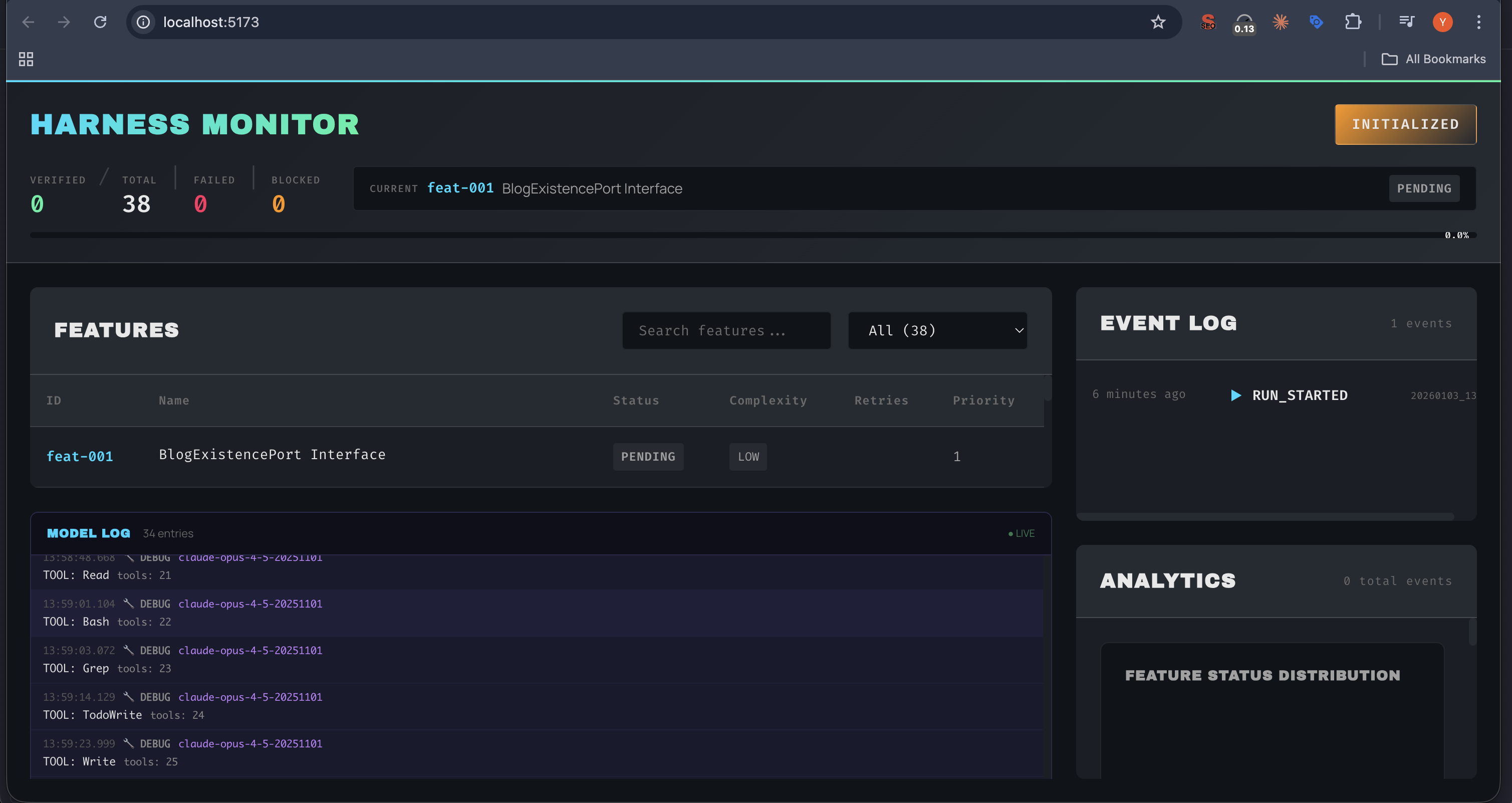 The Harness Monitor showing a live TDD session: 38 features queued, real-time model logs, and event tracking
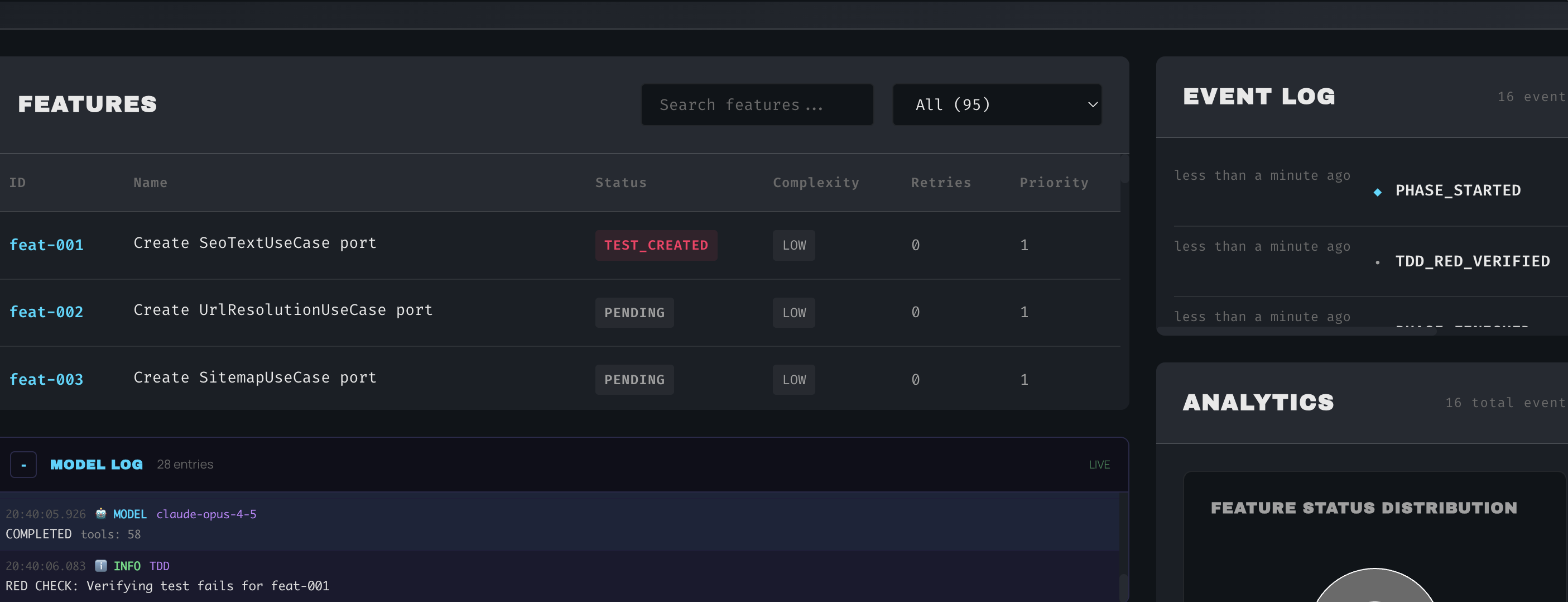 feat-001 enters TEST_CREATED state after Opus writes the tests. The event log shows TDD_RED_VERIFIED—tests fail as expected.
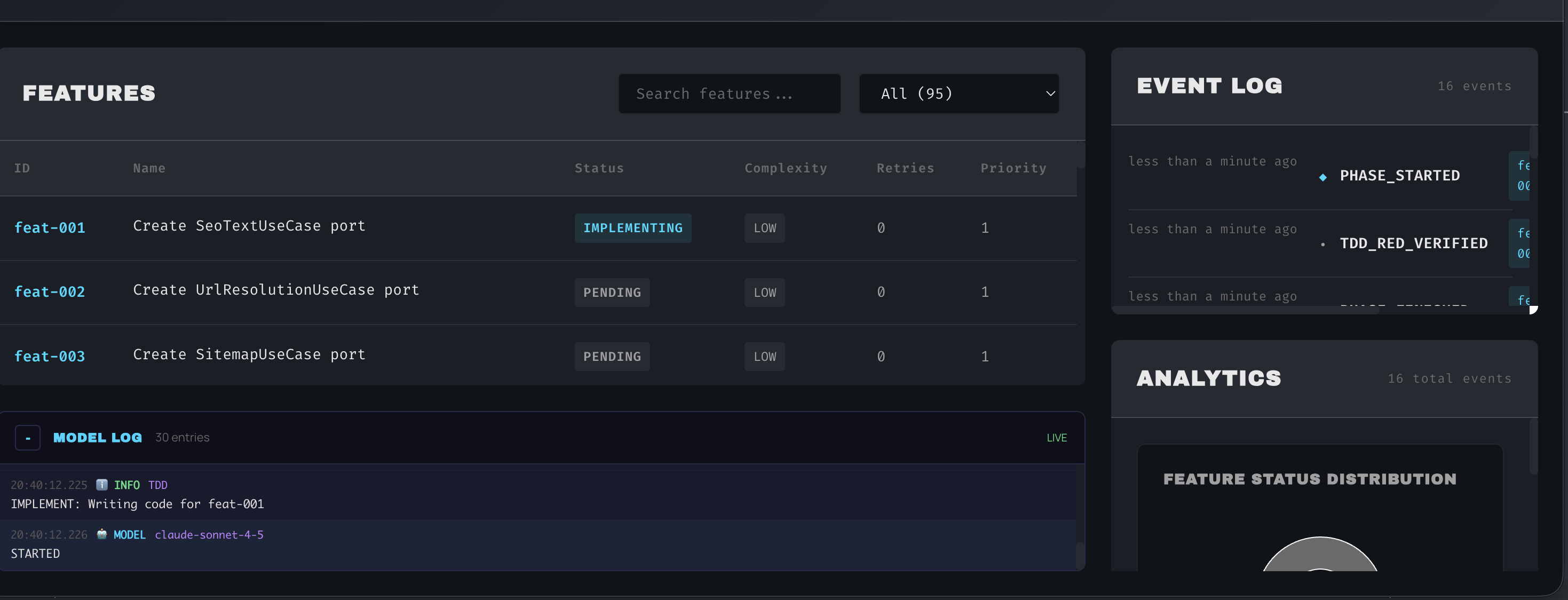 feat-001 transitions to IMPLEMENTING state. Sonnet takes over and begins writing the minimal code to pass the tests.
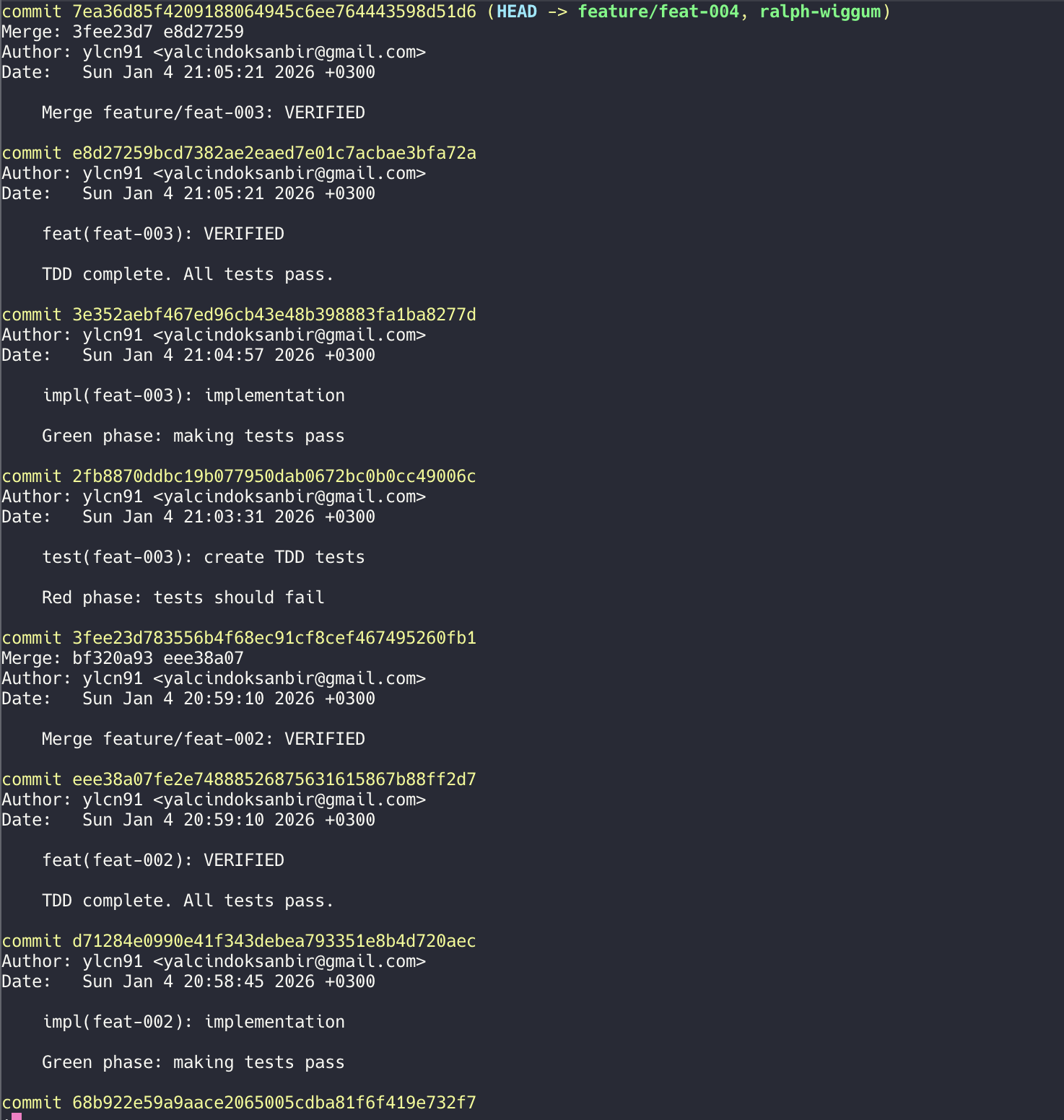 The TDD cycle reflected in git history: test → impl → VERIFIED. Each phase creates a checkpoint for safe rollback.
The dashboard provides:
- Status Overview: Verified/Failed/Blocked counts at a glance
- Current Feature: What’s being worked on right now
- Features Table: Searchable list with status, complexity, retries, and priority
- Model Log: Live streaming of tool calls (Read, Bash, Grep, Write, etc.)
- Event Log: Chronological audit trail of all harness events
- Analytics: Feature status distribution and progress metrics
The backend uses Server-Sent Events (SSE) for real-time updates:
# ui/backend/main.py
from fastapi import FastAPI
from sse_starlette.sse import EventSourceResponse

app = FastAPI()

@app.get("/events")
async def event_stream():
    async def generate():
        async for event in watch_events_file():
            yield {"event": event.type, "data": json.dumps(event.dict())}

    return EventSourceResponse(generate())

@app.get("/status")
async def get_status():
    state = await load_state()
    return {
        "verified": len([f for f in state.features if f.status == "VERIFIED"]),
        "in_progress": len([f for f in state.features if f.status == "IMPLEMENTING"]),
        "pending": len([f for f in state.features if f.status == "PENDING"]),
        "failed": len([f for f in state.features if f.status == "FAILED"]),
        "blocked": len([f for f in state.features if f.status == "BLOCKED"]),
    }
The frontend uses React with TanStack Query:
// ui/frontend/src/App.tsx
import { useQuery } from '@tanstack/react-query';
import { useEventSource } from './hooks/useEventSource';

function Dashboard() {
  const { data: status } = useQuery({
    queryKey: ['status'],
    queryFn: () => fetch('/api/status').then(r => r.json()),
    refetchInterval: 5000,
  });

  const events = useEventSource('/api/events');

  return (
    <div className="dashboard">
      <ProgressPanel status={status} />
      <ActivityPanel events={events} />
      <TimelinePanel events={events} />
    </div>
  );
}
The Muscle: Claude Agent SDK Deep Dive
The Autonomous Harness isn’t just a wrapper around API calls—it’s built on the Claude Agent SDK, leveraging its full feature set to create a truly autonomous system. Let me show you the muscles under the hood.
SDK Client Factory
Every agent invocation goes through a sophisticated client factory that configures permissions, hooks, and capabilities:
# harness/agents/client_factory.py
from claude_agent_sdk import ClaudeAgentOptions, HookMatcher

class AgentClientFactory:
    """Factory for creating configured SDK clients."""

    def create_client(
        self,
        model: str,
        allowed_files: List[str],
        read_only_files: List[str] = None,
        plugins: List[str] = None,
        subagents: List[SubagentDefinition] = None,
    ) -> ClaudeAgentOptions:

        # Build permission system
        permissions = self._build_permissions(allowed_files, read_only_files)

        # Register lifecycle hooks
        hooks = self._build_hooks()

        # Configure MCP servers
        mcp_servers = self._configure_mcp_servers()

        return ClaudeAgentOptions(
            model=model,
            permissions=permissions,
            hooks=hooks,
            mcp_servers=mcp_servers,
            plugins=plugins,
            agents=subagents,  # Subagent definitions
            sandbox=True,
            auto_allow_bash_if_sandboxed=True,
        )
Permission System
The SDK’s permission system is granular and powerful:
def _build_permissions(
    self,
    allowed_files: List[str],
    read_only_files: List[str] = None
) -> PermissionConfig:
    """Build file permission configuration."""

    return PermissionConfig(
        allow=[
            # Glob patterns for writable files
            *allowed_files,
        ],
        deny=[
            # Protected paths - always denied
            ".env",
            "secrets/**/*",
            "credentials/**/*",
            ".git/**/*",
            "state/**/*",
            "harness/**/*",
            "node_modules/**/*",
        ],
        read_only=[
            # Can read but not write
            *(read_only_files or []),
        ]
    )
Lifecycle Hooks
The SDK supports three types of hooks that intercept tool execution:
def _build_hooks(self) -> List[Hook]:
    """Register all lifecycle hooks."""

    return [
        # PreToolUse: Validate before execution
        Hook(
            event="PreToolUse",
            matcher=HookMatcher(tool_name="Write|Edit"),
            handler=self.scope_enforcement_hook,
            on_failure="block",
        ),
        Hook(
            event="PreToolUse",
            matcher=HookMatcher(tool_name="Bash"),
            handler=self.bash_security_hook,
            on_failure="block",
        ),
        Hook(
            event="PreToolUse",
            matcher=HookMatcher(file_pattern="**/test_*.py|**/*.test.ts"),
            handler=self.test_protection_hook,
            on_failure="block",
        ),

        # PostToolUse: Audit after execution
        Hook(
            event="PostToolUse",
            matcher=HookMatcher(tool_name=".*"),  # All tools
            handler=self.audit_log_hook,
        ),

        # Stop: Custom termination conditions
        Hook(
            event="Stop",
            handler=self.graceful_shutdown_hook,
        ),
    ]
Streaming & Usage Tracking
The SDK provides real-time streaming and detailed usage metrics:
async def run_with_streaming(
    self,
    client: ClaudeAgentOptions,
    prompt: str,
    feature_id: str,
) -> AgentResult:
    """Run agent with streaming output and usage tracking."""

    total_usage = TokenUsage()
    artifacts = []

    async for event in client.stream(prompt):
        match event.type:
            case "text_delta":
                print(event.text, end="", flush=True)

            case "tool_use":
                tool_name = event.tool_name
                tool_input = event.input

                # Detect subagent invocation
                if tool_name == "Task":
                    subagent_type = tool_input.get("subagent_type")
                    print(f"\n[Spawning Subagent: {subagent_type}]")

                artifacts.append({
                    "tool": tool_name,
                    "input": tool_input,
                    "timestamp": datetime.now().isoformat(),
                })

            case "usage":
                total_usage.input_tokens += event.input_tokens
                total_usage.output_tokens += event.output_tokens
                total_usage.cache_read_tokens += event.cache_read_tokens
                total_usage.cache_creation_tokens += event.cache_creation_tokens

            case "error":
                await self.handle_error(event, feature_id)

    return AgentResult(
        success=True,
        usage=total_usage,
        artifacts=artifacts,
    )
Plugin Architecture: Extensibility by Design
The harness uses a local plugin system that extends Claude’s capabilities with custom commands, agents, and hooks.
Plugin Structure
Each plugin is a self-contained directory:
plugins/
├── autonomous-harness/
│   ├── .claude-plugin/
│   │   ├── plugin.json          # Plugin manifest
│   │   ├── .lsp.json           # LSP server configuration
│   │   └── hooks.json          # Hook definitions
│   ├── agents/
│   │   ├── architect.md        # Agent definition
│   │   ├── implementer.md
│   │   ├── verifier.md
│   │   ├── debugger.md
│   │   └── context-analyzer.md
│   ├── skills/
│   │   ├── tdd-cycle.md        # Skill definition
│   │   └── lessons-learned.md
│   └── hooks/
│       ├── scope_check.py      # Hook implementation
│       ├── security_check.py
│       └── test_protection.py
│
└── context-analyzer/
    └── .claude-plugin/
        ├── plugin.json
        └── .lsp.json
Plugin Manifest
The plugin.json defines what the plugin provides:
{
  "name": "autonomous-harness",
  "version": "1.0.0",
  "description": "TDD enforcement for autonomous coding",

  "commands": [
    {
      "name": "tdd",
      "description": "Run complete TDD cycle for a feature"
    },
    {
      "name": "verify",
      "description": "Verify implementation against tests"
    },
    {
      "name": "status",
      "description": "Show TDD progress for all features"
    },
    {
      "name": "rollback",
      "description": "Rollback failed feature changes"
    },
    {
      "name": "lessons",
      "description": "Show lessons learned from failures"
    }
  ],

  "agents": [
    "architect",
    "implementer",
    "verifier",
    "debugger",
    "context-analyzer"
  ],

  "skills": [
    "tdd-cycle",
    "lessons-learned"
  ],

  "hooks": "hooks/hooks.json",
  "lspServers": ".lsp.json"
}
Hook Configuration
Hooks are defined declaratively in hooks.json:
{
  "hooks": [
    {
      "name": "scope-check",
      "event": "PreToolUse",
      "matcher": {
        "tool_name": "Write|Edit"
      },
      "command": "python3 hooks/scope_check.py",
      "on_failure": "block",
      "description": "Enforce file scope boundaries"
    },
    {
      "name": "test-protection",
      "event": "PreToolUse",
      "matcher": {
        "file_pattern": "**/test_*.py|**/*.test.ts|**/*.spec.ts"
      },
      "command": "python3 hooks/test_protection.py",
      "on_failure": "block",
      "description": "Prevent test modification during implementation"
    },
    {
      "name": "security-check",
      "event": "PreToolUse",
      "matcher": {
        "tool_name": "Bash"
      },
      "command": "python3 hooks/security_check.py",
      "on_failure": "block",
      "description": "Validate bash commands against whitelist"
    },
    {
      "name": "audit-log",
      "event": "PostToolUse",
      "matcher": {
        "tool_name": ".*"
      },
      "command": "python3 hooks/audit_log.py",
      "description": "Log all tool invocations for traceability"
    },
    {
      "name": "test-result-capture",
      "event": "PostToolUse",
      "matcher": {
        "command_pattern": "pytest|npm test|cargo test|go test"
      },
      "command": "python3 hooks/capture_results.py",
      "description": "Capture and analyze test results"
    }
  ]
}
Loading Plugins
The SDK loads plugins at client initialization:
def load_plugins(self, plugin_dirs: List[Path]) -> List[Plugin]:
    """Load local plugins from directories."""

    plugins = []

    for plugin_dir in plugin_dirs:
        manifest_path = plugin_dir / ".claude-plugin" / "plugin.json"

        if manifest_path.exists():
            manifest = json.loads(manifest_path.read_text())

            plugin = Plugin(
                name=manifest["name"],
                commands=self._load_commands(plugin_dir, manifest),
                agents=self._load_agents(plugin_dir, manifest),
                skills=self._load_skills(plugin_dir, manifest),
                hooks=self._load_hooks(plugin_dir, manifest),
                lsp_servers=self._load_lsp_config(plugin_dir, manifest),
            )

            plugins.append(plugin)

    return plugins
LSP Integration: Code Intelligence for Agents
One of the most powerful features is Language Server Protocol integration. This gives agents the same code intelligence that developers enjoy in their IDEs.
Multi-Language Support
The harness configures LSP servers for six languages:
{
  "python": {
    "command": "pylsp",
    "args": [],
    "languages": ["python"],
    "rootUri": "${workspaceFolder}"
  },
  "typescript": {
    "command": "typescript-language-server",
    "args": ["--stdio"],
    "languages": ["typescript", "typescriptreact", "javascript", "javascriptreact"]
  },
  "java": {
    "command": "jdtls",
    "args": ["-data", "${workspaceFolder}/.jdt"],
    "languages": ["java"]
  },
  "go": {
    "command": "gopls",
    "args": ["serve"],
    "languages": ["go"]
  },
  "rust": {
    "command": "rust-analyzer",
    "args": [],
    "languages": ["rust"]
  },
  "cpp": {
    "command": "clangd",
    "args": ["--background-index"],
    "languages": ["c", "cpp", "objc", "objcpp"]
  }
}
LSP Operations
Agents can use LSP for powerful code analysis:
# Available LSP operations
LSP_OPERATIONS = [
    "documentSymbol",      # List all symbols in a file
    "goToDefinition",      # Find where a symbol is defined
    "goToImplementation",  # Find implementations of interfaces
    "findReferences",      # Find all references to a symbol
    "hover",               # Get type info and documentation
    "prepareCallHierarchy", # Get call hierarchy
    "incomingCalls",       # Find callers of a function
    "outgoingCalls",       # Find functions called by a function
]
Smart Context Analysis
The real magic happens in the context-analyzer agent, which uses LSP to build a dependency graph:
async def analyze_context(
    self,
    entry_file: Path,
    max_hops: int = 3,
) -> ContextAnalysis:
    """
    Use LSP to find all relevant files for a feature.

    Starting from the entry file (usually a test file), trace imports
    and references to build a minimal but complete context.
    """

    relevant_files = set()
    visited = set()
    queue = [(entry_file, 0)]

    while queue:
        current_file, depth = queue.pop(0)

        if current_file in visited or depth > max_hops:
            continue

        visited.add(current_file)
        relevant_files.add(current_file)

        # Get all symbols in the file
        symbols = await self.lsp.document_symbol(current_file)

        for symbol in symbols:
            if symbol.kind == "import":
                # Trace the import to its source
                definition = await self.lsp.go_to_definition(
                    current_file,
                    symbol.location
                )

                if definition and definition.uri.startswith(self.workspace):
                    # It's a local file, add to queue
                    queue.append((definition.uri, depth + 1))

            elif symbol.kind in ["function", "class", "method"]:
                # Find all references to this symbol
                refs = await self.lsp.find_references(
                    current_file,
                    symbol.location
                )

                for ref in refs:
                    if ref.uri.startswith(self.workspace):
                        queue.append((ref.uri, depth + 1))

    return ContextAnalysis(
        entry_file=entry_file,
        relevant_files=list(relevant_files),
        symbol_count=len(symbols),
        hop_depth=max_hops,
    )
Why LSP Matters
Without LSP, agents would need to read the entire codebase to understand dependencies. With LSP:
- Smart Context Pruning: Only load files that are actually relevant
- Accurate Navigation: Jump to definitions instead of grepping
- Type Information: Understand interfaces and contracts
- Call Hierarchy: Trace how functions interact
This is especially powerful for the Implementer agent:
async def implement_with_lsp_context(
    self,
    feature: Feature,
) -> PhaseResult:
    """Implementation with LSP-powered context awareness."""

    # First, analyze context from the test file
    context = await self.context_analyzer.analyze_context(
        entry_file=feature.test_file,
        max_hops=3,
    )

    # Build a focused prompt with only relevant files
    prompt = f"""
    Implement code to pass these tests:

    Test file: {feature.test_file}
    ```
    {await self.read_file(feature.test_file)}
    ```

    Relevant project files (determined via LSP analysis):
    {self._format_relevant_files(context.relevant_files)}

    Focus on the interfaces and types shown above.
    Write minimal code to pass the tests.
    """

    return await self.sonnet.run(prompt)
Subagents: Specialized Workers in the Pipeline
The harness orchestrates seven specialized subagents, each optimized for a specific task in the TDD pipeline.
Subagent Definitions
Each subagent is defined with its own model, tools, and purpose:
# harness/agents/definitions.py

SUBAGENT_DEFINITIONS = [
    SubagentDefinition(
        name="code-architect",
        model="opus",
        description="Creates TDD tests and feature specifications",
        tools=["Read", "Write", "Edit", "Glob", "Grep"],
        system_prompt="""
        You are a TDD architect. Your job is to create comprehensive,
        executable tests BEFORE any implementation exists.

        Rules:
        - Tests must import from non-existent modules
        - Tests must call functions that don't exist yet
        - Cover happy paths, edge cases, and error handling
        - Write real code, not descriptions
        """
    ),

    SubagentDefinition(
        name="implementer",
        model="sonnet",
        description="Writes minimal code to pass tests",
        tools=["Read", "Write", "Edit", "Bash", "Glob", "Grep", "LSP"],
        system_prompt="""
        You are an implementer. Your job is to write the minimum code
        needed to make tests pass.

        Rules:
        - Read the tests first to understand requirements
        - Write minimal code - no over-engineering
        - You can READ test files but NOT modify them
        - Use LSP to understand existing code structure
        """
    ),

    SubagentDefinition(
        name="build-validator",
        model="sonnet",
        description="Validates builds and test execution",
        tools=["Read", "Bash", "Glob", "Grep"],
        system_prompt="""
        You are a build validator. Run test suites and report results.

        Rules:
        - Run the specified test command
        - Capture and analyze output
        - Report pass/fail status clearly
        - Identify specific failing tests
        """
    ),

    SubagentDefinition(
        name="verify-app",
        model="sonnet",
        description="End-to-end application verification",
        tools=["Read", "Bash", "Glob", "Grep", "Puppeteer"],
        system_prompt="""
        You are an E2E verifier. Test the complete application.

        Rules:
        - Start the application if needed
        - Execute browser-based tests
        - Verify API endpoints
        - Report any integration issues
        """
    ),

    SubagentDefinition(
        name="oncall-guide",
        model="sonnet",
        description="Debugging and error resolution expert",
        tools=["Read", "Bash", "Glob", "Grep", "LSP"],
        system_prompt="""
        You are a debugging expert. Analyze failures and suggest fixes.

        Rules:
        - Trace errors to root cause
        - Use LSP to understand code flow
        - Suggest specific, actionable fixes
        - Don't make changes, only analyze
        """
    ),

    SubagentDefinition(
        name="code-simplifier",
        model="sonnet",
        description="Refactoring and code cleanup",
        tools=["Read", "Write", "Edit", "Bash", "Glob", "Grep"],
        system_prompt="""
        You are a code simplifier. Improve code quality after tests pass.

        Rules:
        - Only refactor, don't change behavior
        - Run tests after each change
        - Focus on readability and maintainability
        - Remove duplication and dead code
        """
    ),

    SubagentDefinition(
        name="context-analyzer",
        model="haiku",  # Lightweight model for fast analysis
        description="LSP-based dependency analysis",
        tools=["LSP", "Read", "Glob"],
        system_prompt="""
        You are a context analyzer. Use LSP to find relevant files.

        Rules:
        - Start from the entry file (usually tests)
        - Use documentSymbol to find imports
        - Use goToDefinition to trace dependencies
        - Return JSON with relevant_files array
        - Maximum 3 hops from entry point
        """
    ),
]
Subagent Orchestration
The orchestrator spawns subagents at each phase:
async def run_phase_with_subagent(
    self,
    phase: str,
    feature: Feature,
) -> PhaseResult:
    """Execute a phase using the appropriate subagent."""

    # Map phases to subagents
    phase_agents = {
        "INITIALIZE": "code-architect",
        "CONTEXT_ANALYZE": "context-analyzer",
        "ARCHITECT": "code-architect",
        "IMPLEMENT": "implementer",
        "GREEN_CHECK": "build-validator",
        "VERIFY": "verify-app",
        "DEBUG": "oncall-guide",
        "REFACTOR": "code-simplifier",
    }

    subagent_name = phase_agents.get(phase)
    if not subagent_name:
        raise ValueError(f"Unknown phase: {phase}")

    # Get subagent definition
    definition = self.get_subagent_definition(subagent_name)

    # Create client with subagent configuration
    client = self.client_factory.create_client(
        model=definition.model,
        allowed_files=feature.allowed_files,
        tools=definition.tools,
    )

    # Spawn the subagent via Task tool
    result = await client.run(
        prompt=self._build_phase_prompt(phase, feature),
        subagent_type=subagent_name,
    )

    return PhaseResult(
        phase=phase,
        subagent=subagent_name,
        success=result.success,
        output=result.output,
    )
Multi-Model Strategy
Notice the model selection per subagent:
| Subagent | Model | Why |
|---|---|---|
| code-architect | Opus | Needs deep reasoning for comprehensive test design |
| implementer | Sonnet | Fast execution, can follow test specs |
| build-validator | Sonnet | Simple task: run tests, report results |
| verify-app | Sonnet | E2E testing is procedural |
| oncall-guide | Sonnet | Debugging follows patterns |
| code-simplifier | Sonnet | Refactoring is mechanical |
| context-analyzer | Haiku | Lightweight LSP queries, fast turnaround |
This strategy optimizes for both quality (Opus for critical thinking) and cost (Haiku/Sonnet for routine tasks):
Cost breakdown per feature (approximate):
- Architect (Opus): ~$0.15
- Context Analysis (Haiku): ~$0.01
- Implementation (Sonnet): ~$0.05
- Validation (Sonnet): ~$0.02
- Verification (Sonnet + Opus review): ~$0.08
─────────────────────────────────────────
Total per feature: ~$0.31

Compared to Opus-only: ~$0.75/feature (58% savings!)
Subagent Communication
Subagents don’t communicate directly—they pass information through artifacts and state:
| Step | Subagent | Model | Output |
|---|---|---|---|
| 1 | code-architect | Opus | Creates test files |
| 2 | context-analyzer | Haiku | Returns relevant_files.json |
| 3 | implementer | Sonnet | Creates implementation |
| 4 | build-validator | Sonnet | Returns test_results.json |
| 5 | verify-app | Sonnet | Final verification |
Each subagent:
- Reads artifacts from previous phases
- Performs its specialized task
- Writes artifacts for subsequent phases
- Returns a structured result
This share-nothing architecture ensures:
- Isolation: Subagent failures don’t corrupt state
- Reproducibility: Same inputs → same outputs
- Debuggability: Each phase’s artifacts are preserved
- Fresh Context: No cross-contamination between phases
Lessons Learned: What the Harness Taught Me
Building this system taught me several hard lessons about autonomous AI agents:
1. Fresh Context is Everything
Early versions maintained a single conversation with the agent across all features. This was a disaster. By feature 10, the agent was:
- Confusing current feature with previous ones
- Repeating mistakes it had “learned” from earlier failures
- Running out of context window
Solution: Fresh context for every feature, every phase. Each agent invocation creates a new SDK client. Yes, it’s more expensive. Yes, it’s worth it.
2. Tests Must Be Proven to Fail
Without the RED CHECK, agents write tests that pass immediately. Not because they’re testing existing code, but because they’re testing nothing:
def test_user_login():
    # This test "passes" but tests nothing
    assert True
Or worse:
def test_user_login():
    user = {"email": "test@example.com"}
    assert user["email"] == "test@example.com"  # Tests dict, not login
The RED CHECK forces agents to write tests that actually import from non-existent modules, calling functions that don’t exist yet.
3. Scope Enforcement Prevents Chaos
Without scope constraints, agents will “helpfully” modify unrelated files:
- “While I was implementing login, I noticed the database connection could be optimized…”
- “I refactored the entire utils folder for consistency…”
- “I updated all the import statements across the codebase…”
Scope enforcement stops this. Each feature has explicit allowed_files patterns. Touch anything else, and the feature fails.
4. Retries with Context Beat Immediate Failure
First attempts often fail for simple reasons:
- Missing
__init__.pyfiles - Typos in import paths
- Wrong function signatures
Sending the error output back to the agent usually results in a quick fix. Three retries is the sweet spot—enough to handle common issues, not so many that we waste time on fundamentally broken implementations.
5. Multi-Model Orchestration Optimizes Cost and Quality
Using Opus for everything is expensive and slow. Using Sonnet for everything sacrifices quality. The hybrid approach:
- Opus: Architecture, test design, code review (needs deep reasoning)
- Sonnet: Implementation (can follow a spec quickly)
This reduces costs by ~60% while maintaining quality.
6. Git Checkpoints Enable Fearless Experimentation
Every phase commits to git. This means:
- Failed features can be rolled back cleanly
- Successful features have clear history
- We can always return to a known-good state
git log --oneline
abc123 feat(feat-024): User Notifications - VERIFIED
def456 impl(feat-024): implement notification service
ghi789 test(feat-024): create TDD tests for notifications
jkl012 feat(feat-023): Email Templates - VERIFIED
...
7. Append-Only Logs are Invaluable
The events.jsonl file has saved me countless hours of debugging. When something goes wrong:
# Find the failing feature
cat events.jsonl | jq 'select(.feature_id=="feat-017")'

# See the exact sequence of events
# See the duration of each phase
# See the error messages
# Reconstruct exactly what happened
Future Work: Where Do We Go From Here
The Autonomous Harness v2 is production-ready, but let’s be honest—this is just the beginning. I’ve got bigger dreams. Much bigger. The kind of dreams that make project managers nervous and DevOps engineers reach for their stress balls.
1. Parallel Feature Execution
Currently, features are processed sequentially. Features without dependencies could run in parallel:
feat-001 ─────┬───────────────────────────────────────> VERIFIED
              │
feat-002 ─────┼──────────────────────────────────────> VERIFIED
              │
feat-003 ─────┴─── (depends on 001, 002) ───────────> VERIFIED
2. Learning from Failures
Store lessons from failed features and inject them into future prompts:
lessons = await lessons_manager.get_relevant_lessons(feature)
prompt = f"""
Previous attempts at similar features have failed due to:
{lessons}

Avoid these patterns when implementing {feature.name}
"""
3. Human-in-the-Loop Approval
Add checkpoints where humans can review and approve before proceeding:
ARCHITECT → [Human Review] → RED_CHECK → IMPLEMENT → [Human Review] → VERIFY
4. Cost Tracking and Budgets
Track API costs per feature and enforce budgets:
if feature.cost_so_far > feature.max_budget:
    await mark_blocked(feature, "Budget exceeded")
5. The Grand Vision: Jira-to-Production Pipeline
Here’s where things get interesting. And by “interesting,” I mean “the kind of automation that will either make you a legend or get you fired.”
Picture this: A product manager creates a Jira ticket. They write some acceptance criteria, maybe attach a mockup, and hit “Create.” Then they go get coffee. By the time they’re back at their desk, the feature is implemented, tested, and waiting for QA review.
No, I haven’t been drinking. This is the actual roadmap:
THE AUTONOMOUS DEVELOPMENT PIPELINE (a.k.a. “The Dream”)
| Step | Component | What Happens |
|---|---|---|
| 1 | JIRA TICKET | PM creates “Add dark mode toggle” with acceptance criteria |
| 2 | WEBHOOK LISTENER | Webhook fires. “Ah, fresh meat.” - The Harness, probably |
| 3 | REPO SCOUT | Finds relevant repos in GitHub/Bitbucket. “Found: ui-components, design-system” |
| 4 | SANDBOX FACTORY | Spins up isolated Docker environment with all dependencies |
| 5 | AUTONOMOUS HARNESS | ARCHITECT → RED → IMPLEMENT → GREEN → VERIFY |
| 6 | BRANCH CREATOR | Creates feature/JIRA-1234-dark-mode, pushes to test branch |
| 7 | JIRA UPDATER | Status: “Ready for QA”, adds PR link, test coverage |
| 8 | QA TEAM | Spits out coffee - “Wait, it’s already done?!” |
The technical implementation would look something like this:
# The dream, in code form

@webhook.route("/jira/ticket-created", methods=["POST"])
async def handle_jira_webhook(request: Request):
    """
    When a Jira ticket is created, the magic begins.
    """
    ticket = JiraTicket.from_webhook(request.json)

    # Step 1: Understand what we're building
    requirements = await opus.analyze_ticket(
        title=ticket.title,
        description=ticket.description,
        acceptance_criteria=ticket.acceptance_criteria,
        attachments=ticket.attachments,  # mockups, specs, etc.
    )

    # Step 2: Find the relevant repositories
    repos = await repo_scout.find_relevant_repos(
        requirements=requirements,
        org=ticket.organization,
        platforms=["github", "bitbucket"],
    )

    # Step 3: Spin up an isolated sandbox
    sandbox = await sandbox_factory.create(
        repos=repos,
        runtime="docker",
        base_image="node:20-alpine",  # or whatever the project needs
        env_vars=await vault.get_safe_env_vars(ticket.project),
    )

    # Step 4: Run the autonomous harness
    result = await autonomous_harness.run(
        sandbox=sandbox,
        requirements=requirements,
        mode="daemon",
        max_budget=50.00,  # Don't bankrupt us on a dark mode toggle
    )

    # Step 5: Create the branch and PR
    if result.all_features_verified:
        branch = await git_ops.create_branch(
            sandbox=sandbox,
            name=f"feature/{ticket.key}-{slugify(ticket.title)}",
        )

        pr = await github.create_pull_request(
            repo=repos.primary,
            branch=branch,
            title=f"[{ticket.key}] {ticket.title}",
            body=generate_pr_body(ticket, result),
        )

        # Step 6: Update Jira
        await jira.transition_ticket(
            ticket_key=ticket.key,
            status="Ready for QA",
            comment=f"""
            Implementation complete.

            **Pull Request:** {pr.url}
            **Features Implemented:** {len(result.verified_features)}
            **Test Coverage:** {result.coverage}%
            **Total Cost:** ${result.total_cost:.2f}

            The autonomous harness has completed all acceptance criteria.
            Please review the PR and run manual QA tests.

            _This implementation was generated automatically._
            """,
        )

    # Step 7: Clean up the sandbox
    await sandbox.destroy()

    return {"status": "success", "pr_url": pr.url}
Why is this the future?
Think about the typical lifecycle of a Jira ticket:
- Day 1: PM creates ticket
- Day 2-3: Ticket sits in backlog
- Day 4: Sprint planning, ticket gets picked up
- Day 5-7: Developer implements feature
- Day 8: Code review
- Day 9: QA testing
- Day 10: Bug fixes
- Day 11: Merged to main
That’s 11 days for a dark mode toggle.
With the autonomous pipeline:
- Hour 0: PM creates ticket
- Hour 1: Webhook triggers, harness starts
- Hour 2-4: Implementation and testing
- Hour 5: PR created, Jira updated
- Hour 6-8: QA review (the humans still have jobs!)
- Hour 9: Merged to main
That’s 9 hours. Same quality. Same test coverage. Same code review process. Just without the ticket sitting in backlog purgatory for three days.
The skeptics will say:
- “But what about complex features?” — The harness breaks them into atomic pieces. Complex is just “many simple.”
- “What about domain knowledge?” — That’s what the acceptance criteria and attached specs are for. Plus LSP gives context.
- “What about code style consistency?” — The Opus code review enforces project standards.
- “What if it makes mistakes?” — That’s what QA is for. The harness just gets you to QA faster.
What needs to happen first:
- Secure sandbox orchestration — Can’t have agents running arbitrary code without isolation
- Repository permission management — OAuth flows for GitHub/Bitbucket access
- Jira integration — Bidirectional sync with ticket status
- Cost controls — Hard limits to prevent runaway API costs
- Human approval gates — Some changes need human sign-off before proceeding
This isn’t science fiction. Every piece of this pipeline exists. We just need to wire them together and add enough guardrails to make it production-safe.
The question isn’t if this will happen. It’s when. And whether you’ll be the one building it or the one reading about it on Hacker News.
Conclusion
The Autonomous Harness represents a fundamental shift in how we think about AI coding agents. Instead of hoping they’ll follow best practices, we enforce them. Instead of trusting their output, we verify it through multiple layers. Instead of abandoning failed attempts, we retry with growing context.
TDD isn’t just a nice-to-have—it’s the foundation that makes autonomous coding reliable. When tests must fail before implementation and pass after, when scope is enforced through hooks, when every change is verified by five layers of checks, you get code you can actually deploy.
The future of software development isn’t AI replacing developers. It’s AI and developers working together, with systems like the Autonomous Harness ensuring that the AI stays on track, follows best practices, and produces code that humans can trust.
Now if you’ll excuse me, I have 47 more features to verify. And after that? Maybe I’ll teach this thing to write its own Jira tickets. Now that would be something.
References & Further Reading
This project was heavily inspired by Anthropic’s research on autonomous coding agents:
- Building Effective Agents — Anthropic’s guide to agent architectures and patterns
- Effective Harnesses for Long-Running Agents — Deep dive into harness design principles that directly influenced this project
- Claude Autonomous Coding Quickstart — Official reference implementation from Anthropic
The TDD enforcement approach was inspired by conversations with engineers who’ve watched too many AI agents “helpfully” delete production databases. You know who you are.
This project is currently in active development. If you’re interested in the autonomous Jira-to-production pipeline vision, stay tuned—or reach out. The future of software development is being written right now, one TDD cycle at a time.